If you’ve ever found yourself troubleshooting a pallet jack scale that’s giving inconsistent, off, or plain wrong weight readings, you know how frustrating it is—especially when you’re relying on that number for inventory counts, shipping costs, or warehouse safety checks. As a pallet jack scale supplier, I’ve spent hundreds of hours walking mechanics, warehouse managers, and new forklift operators through exactly how to reset these units, and let me tell you: most of the time, it’s way simpler than you think. I’ve seen folks waste hours calling tech support or panicking over a “broken” scale when all it needed was a quick reset, tailored to the model they’re using. Pallet Jack Scale

First, a quick reality check: pallet jack scales aren’t magic. They’re precision tools built with load cells, tiny sensors that measure weight as pressure, and a display that translates that pressure into a number. Resetting them isn’t about fixing a major issue—it’s about recalibrating that system to work properly, which usually resolves 80% of common reading problems. That said, there’s no one-size-fits-all reset process, and skipping a key step (like confirming zero load) is how you end up with a scale that’s still reading wrong a week later. I’ve made that mistake myself early on in my supply role, when I sent a step-by-step guide that worked for our standard model to a customer who owned a heavy-duty unit, and they got back to me a week later with a note that their scale was “still acting up.” Oops. Lesson learned: always start with identifying your unit type before jumping into steps.
Let’s break this down into two parts: first, when you need to reset a pallet jack scale, and second, the step-by-step processes for the three most common models our customers buy (since that’s what I help with every day) plus a quick guide for custom/heavy-duty units.
When should you reset your pallet jack scale? The short list, based on real customer issues:
- The display shows a non-zero reading when the pallet jack is fully lowered and empty (that’s called drift, and it’s the #1 reason folks reach out about resetting)
- Weight readings jump randomly when you place a load that’s consistent on a known scale
- You recently moved the scale (even a short distance to another part of the warehouse can throw off the calibration)
- The scale was bumped or dropped, even at low speed
- You’ve noticed a difference of 5% or more between this scale and another trusted unit in your facility for the same load
If none of these apply, you probably don’t need a full reset—just a quick zero-set, which is the first step in every reset process anyway. Now, let’s get into the actual steps.
First, prep work you need to do before resetting, no matter the model. This is the step most people skip, and it’s why they end up with bad results.
- Park the pallet jack on a flat, solid surface. No sloped warehouse floors, no uneven concrete patches—pick a spot that’s as level as possible, and stay there for the whole process. If you move it while resetting, you’ll introduce a new weight that throws off the calibration.
- Remove all loads, pallets, and debris from the forks. Not just the load on top—make sure there’s no dirt, dust, or pallet scrap stuck between the forks or under the load rollers. Even a 2-pound chunk of wood under a fork can throw a reading off.
- Fully lower the forks to their lowest position. Load cells in pallet jack scales are calibrated based on the fork height, and if they’re not all the way down, you’ll get a false zero. I always tell my team to check a unit’s manual to confirm the exact height, but 9 times out of 10, it’s the lowest setting.
- Turn the scale display off and unplug it if it’s battery-powered? Wait, no—wait, battery-powered is different. Let’s clarify: if your scale runs on rechargeable batteries, turn it off completely. If it’s hardwired to a power source (rare, but for some heavy-duty models), disconnect the power source for 30 seconds to clear any temporary glitches. That’s a quick reset I always mention first, because it works for most minor issues.
Now, let’s get to model-specific steps, since that’s where customers get confused. Our most popular units are the Standard Pallet Jack Scale (used for general inventory, shipping under 5,000 lbs), the Heavy-Duty Pallet Jack Scale (up to 10,000 lbs, for construction or manufacturing), and the Low-Profile Pallet Jack Scale (for pallets that sit low to the ground, like retail inventory).
For the Standard Pallet Jack Scale (most common in small to mid-sized warehouses):
This is the model I sell the most, and its reset process is super straightforward, with a few quick steps. Once you’ve done the prep work above:
- Turn the scale display on, making sure it’s in “Weigh” mode (not “Count” or “Tare” mode—those are for specific functions, and resetting in the wrong mode won’t work). The mode button is usually on the front of the display, marked with a small icon that looks like a weight scale.
- Locate the “Zero” or “Reset” button. On our standard units, it’s a large, easy-to-press button on the bottom right of the display, so you don’t have to squint to find it while you’re leaning over the pallet jack.
- Press and hold the “Zero” button for 3 to 5 seconds. Don’t tap it—hold it down. You’ll see the display flash a small indicator, usually “CAL” or “0,” which means it’s in reset mode.
- Keep the forks fully lowered and empty while it resets. The process takes about 10 seconds, and when the display settles on 0.0, you’re done.
- Test it: Grab a pallet that you already know the exact weight of (from another scale, or from a shipping label), place it on your pallet jack, and check the reading. If it’s within 1% of the known weight, you’re good to go. If not, repeat the process once—sometimes the initial hold is too short, and that’s the only mistake I see.
For the Heavy-Duty Pallet Jack Scale (our go-to for construction yards and manufacturing facilities):
These units are built to handle 10,000 lbs, so their reset process is a little more thorough, to account for the higher load capacity. I always tell customers not to skip any steps here, because a drift in these units can mean a 50+ pound error when you’re moving tons of material.
- Do the full prep work: flat surface, empty forks, fully lowered. For heavy-duty units, I also recommend wiping the forks down to remove any debris—construction sites have nails, dirt, and even small rocks that can get stuck and interfere.
- Turn the display on, and make sure you’re in “Weigh” mode. The heavy-duty models have extra modes, like “Hold” for moving loads, so double-check that you’re not in Hold.
- Locate the “Calibrate” or “Full Reset” button—this is on the back of the display, so you’ll need a small flathead screwdriver or the end of a pen to press it, which is a safety feature so workers don’t accidentally reset it mid-load.
- Press and hold the Calibrate button for 7 to 10 seconds. You’ll see the display flash multiple times, and it will show a number like “5000” (that’s the maximum capacity) before going back to 0.0.
- Let the display sit for 15 seconds, then lift the forks slightly (about 2 inches off the ground) and lower them again to make sure there’s no load drift. If they go back to 0.0, you’re done. If not, repeat the process.
One note here: if your heavy-duty scale is reading way off, you may need a calibration weight, but that’s only for major issues. Most of the time, this reset works just fine.
For the Low-Profile Pallet Jack Scale (used for retail and grocery warehouses, where pallets sit low):
These units have thinner forks to get under low pallets, so their load sensors are positioned a little differently, which means a slightly different reset process. I had a customer last year who kept getting a 10-pound error, and it turned out they were lowering the forks all the way into the floor, not just to their lowest setting above the ground—small mistake, big result.
- Prep work: flat surface, empty forks, lowest position that gets under a standard low pallet (not touching the concrete). That’s the key difference here—fully lowered doesn’t mean all the way down to the floor, it’s just low enough for the pallet to slide under.
- Turn the display on, make sure you’re in Weigh mode.
- Press and hold both the “Zero” and “Tare” buttons at the same time for 4 to 6 seconds. You’ll see a small “LP” indicator (for low profile) flash on the display, which means it’s in the correct reset mode.
- Keep the forks at that low position for 10 seconds, then the display will settle on 0.0. Test it with a light load (under 1,000 lbs first, since these are lower capacity) to make sure it works.
Now, what if you’ve tried all these steps and your scale still isn’t resetting? That’s when you need to check for common small issues that aren’t a full reset problem, which I’ve dealt with dozens of times as a supplier. The most common ones:
- Dead batteries: Even if the display turns on, weak batteries can cause drift. Try replacing or recharging the batteries before resetting—9 times out of 10, that fixes the issue.
- Dirty load cells: The load cells are inside the forks, under the metal, so dust and grease can build up there. If you’ve had the scale for more than a year, and resetting doesn’t work, gently clean the load cells with a soft cloth and isopropyl alcohol, then try resetting again.
- Damaged forks: If a fork is bent, even slightly, that can throw off weight readings. If you notice a bend, stop using the scale until it’s repaired—this is a safety issue too, since a bent fork can break under load.
I always tell my customers that resetting a pallet jack scale is a basic skill that every warehouse operator should know. It takes 5 minutes, and it saves you from waiting 24 hours for a tech to come out, or paying for an unnecessary service call. That said, not every scale issue is a quick reset. If you’ve tried all these steps, cleaned the load cells, replaced the batteries, and still have inconsistent readings, that’s when you should reach out to someone who knows pallet jack scales—like our team.
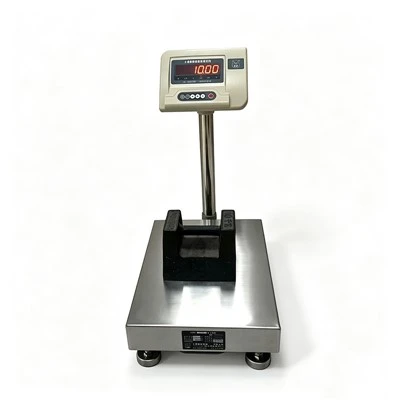
As a supplier, I’ve built my business on helping customers get the most out of their pallet jack scales, not just selling them. I’ve helped small restaurants with 2 pallet jacks figure out how to reset their units after moving to a new location, and I’ve helped large manufacturing facilities set up a maintenance schedule for their 20+ heavy-duty scales to prevent drift. Whether you’re dealing with a minor reading issue or looking to upgrade your current scale, our team can walk you through every step, from resetting your existing unit to finding the right model for your warehouse’s needs. If you’re tired of dealing with inconsistent weight readings or have questions about your pallet jack scale, reach out to our team to discuss your needs and find the right solution for you.
Low Profile Floor Scale References:
- Material Handling Industry Association. (2022). Best Practices for Calibrating and Maintaining Pallet Jack Scales.
- National Warehouse Operations Standard. (2021). Precision Measurement Tools for Inventory and Shipping.
- Pallet Jack Scale Manufacturers Association. (2023). Model-Specific Reset and Calibration Guides.
Shanghai Eagle Brand Weighing Apparatus Co., Ltd.
As one of the most professional pallet jack scale manufacturers and suppliers in China, we’re featured by quality products and good service. Welcome to wholesale advanced pallet jack scale in stock here and get pricelist from our factory. We also accept customized orders.
Address: No. 124, Group 1, Baqiao, Wangjiawei, Zhelin Town, Fengxian District, Shanghai
E-mail: 13386116000@163.com
WebSite: https://www.cneaglebrand.com/
