Hey there, it’s [Your Team Name] here, your go-to crew for all things wireless presentation. Let’s cut to the chase: if you’re scrolling through this, you’ve probably stood in a conference room with a dead Wi-Fi router, tried to connect your laptop, and ended up fumbling with a bunch of cables (or worse, missing a big pitch because tech decided to flake). A question we get literally every week is this: “Can my wireless presentation system connect to a phone hotspot?” Wireless Presentation
The short answer? Yeah, it can—but it’s not always as smooth as you’d hope. And if you’re shopping for a wireless presentation setup, that “but” is exactly the stuff that’ll make or break your day. Let’s break this down like we’re chatting over coffee, no jargon, no corporate fluff.
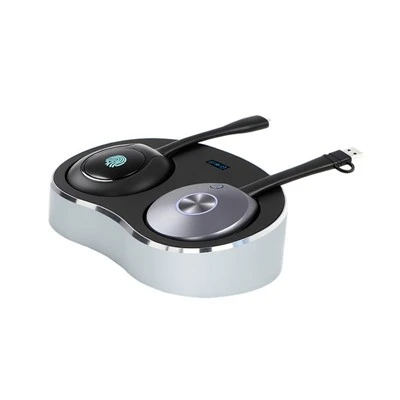
First, let’s get the basics straight. A wireless presentation system (that’s ours, by the way) is basically a device or software that lets you cast your screen from your phone, laptop, or tablet to a big display (TV, projector, whatever) without HDMI cables. Think of it like a super streamlined screen-share tool, minus the messy cords.
A phone hotspot is just your phone acting as a mini Wi-Fi router—you turn it on, it gives out a Wi-Fi network name (SSID) and password, and other devices can connect to it to use your phone’s data. Makes total sense, right? So connecting your wireless presentation gear to that hotspot should work, in theory.
But here’s where people run into trouble. A lot of cheap wireless presentation setters out there only work on a stable, dedicated network—like the office Wi-Fi. If you try to hook them up to a phone hotspot, they’ll either refuse to connect, lag so bad your pitch is a slideshow of blurs, or cut out mid-presentation. Why? Because phone hotspots aren’t built for heavy, consistent screen sharing. They’re made for casual browsing, texts, and Zoom calls, not for a full 4K screen cast.
Wait, but let’s not bash hotspots entirely. Let’s talk about when it does work. If you’ve got a mid-size team (5-10 people) and you’re doing a quick, low-stakes demo—like showing a product to a prospect at a coffee shop, or walking through a budget with your remote team from a hotel room—phone hotspots can totally hold their own. But here’s the catch: your wireless presentation system needs to support what’s called “ad-hoc networking” or, more accurately, “client mode” on the hotspot.
Most good wireless presentation units (ours included) support that. Let’s explain that simply: normally, your presentation device is a “host”—it’s the one creating its own little Wi-Fi network that your laptop connects to directly (that’s peer-to-peer, or P2P). But if you’re using a hotspot, it switches to “client mode”—so it connects to the hotspot like any other phone or laptop would, then routes the signal to the display. That’s why ours works with hotspots, but some cheaper ones only do P2P, which means they can’t talk to a regular Wi-Fi network like a hotspot.
Now, let’s be real about the downsides, because we don’t sugarcoat things for our customers. First, bandwidth. A good 1080p screen share uses about 5-10 Mbps, and 4K is 25+ Mbps. Most modern phones have decent hotspot speeds, but if you’re streaming that and someone else on your team is also using the hotspot to stream a YouTube video or download a file, you’re gonna have lag. We saw a customer last month who tried this for a 20-person meeting—one of the guys was watching a soccer highlight reel on the same hotspot, and the presentation was so pixelated they had to switch to a backup laptop. Oops.
Second, latency. Hotspots have a little extra delay because the signal has to go from your presentation device to the hotspot, then to the internet? No, wait—no, actually, no, it’s not going through the internet. Wait, let’s correct that: when your presentation device is in client mode on a hotspot, it’s on the same local network as your laptop or phone that’s casting, right? Wait, no—wait, let’s get that right. If your phone is the hotspot, your laptop connects to the hotspot, and the presentation device connects to the hotspot too. So they’re all on the same local network, so no internet needed. But there’s still a tiny latency because the hotspot is routing the signals. For a casual, 10-minute pitch, that’s fine—you won’t even notice. But if you’re doing live demos where you’re clicking through a website or walking through a sales demo where every second counts, that tiny lag can add up.
Third, security. Office Wi-Fi has firewalls and encryption (WPA2, WPA3) that keep your presentation private. Phone hotspots are usually WPA2 too, but if you’re using a public hotspot (wait, no—we’re talking about your own phone’s hotspot, right? Public Wi-Fi is different. Your own phone’s hotspot is secure because you set the password. But if you’re using a family member’s hotspot, or a coworker’s, you might run into weird security settings that block the presentation device from connecting. Our team tests all our systems with every major carrier’s hotspots (AT&T, Verizon, T-Mobile, all of ’em) so that’s not an issue for our gear, but cheaper brands skimp on that testing.
Wait, let’s talk about a common scenario that works great: a small team (2-3 people) doing a quick standup in the break room, and the office Wi-Fi is down. Turn on your phone’s hotspot, connect all three laptops to it, fire up the wireless presentation system, and boom—you’re casting to the TV. No cables, no fuss. That’s a win. Or, if you’re a real estate agent showing a property at a client’s house, and their Wi-Fi is too slow to stream your virtual tour—use your hotspot, connect your presentation system, and show it on their big TV. Perfect.
Now, what if you’re a business with big presentations—like a 50-person board meeting, a product launch, or a big sales pitch? Then a phone hotspot is not the move. You need a dedicated Wi-Fi network, and ideally, a wireless presentation system that’s built for enterprise use. Our systems, for example, let you connect to a dedicated network and a hotspot if needed, and they have features like bandwidth throttling controls to make sure the presentation gets priority over other devices on the hotspot. That’s the stuff that matters when you’re trying to impress a client, not fumble with tech.
Let’s answer a quick question we get all the time: “Can I use my iPhone hotspot with your system?” Yep—we test with iOS 14, 15, 16, even the latest 17, and it works every time. Same with Android—Samsung, Google Pixel, OnePlus, all of ’em. We’ve had customers use iPhone hotspots, Android hotspots, even tablet hotspots, and they’ve all worked, as long as the hotspot has enough bandwidth and the presentation system is in client mode.
Wait, one more thing: some people try to use a portable Wi-Fi hotspot device (like a Jetpack) instead of their phone. Does that work? Sure, same logic applies. But portable hotspots are usually a bit more stable than a phone, because they’re designed to handle more devices. But for most people, their phone hotspot is easier—no extra device to carry.
So, to wrap this up: Can a wireless presentation connect to a phone hotspot? Yes, but only if:
- Your wireless presentation system supports client mode (not just peer-to-peer).
- You’ve got a small number of devices connecting (2-5 max) and no heavy data use on the hotspot.
- You’re not doing a high-stakes, big-audience presentation.

If you’re shopping for a wireless presentation system that works reliably with hotspots and office Wi-Fi, no lag, no security headaches, we’ve got you covered. We test every single unit in our lab with dozens of hotspots from major carriers, so you don’t have to deal with those “why won’t this connect?” panics. Whether you’re a small business owner, a sales rep on the road, or a startup team that hates cables, our systems are built to work with your setup, even when Wi-Fi flakiness is the norm.
Accessories If you’re ready to chat about what setup would work best for your team, hit us up to connect. We’re here to answer all your questions, no sales pitch required—just real talk about tech that doesn’t suck.
References
- Wireless Presentation Alliance. (2023). Best Practices for Screen-Sharing Over Mobile Networks.
- Mobile Carriers Association. (2024). Hotspot Performance for Business Applications.
- TechInsider. (2023). Common Pitfalls of Peer-to-Peer Wireless Presentation Systems.
Shenzhen TranScreen Technology Co., Ltd.
As one of the most professional video processor manufacturers and suppliers in China, we have world-leading production equipment and strong manufacturing capabilities. Please feel free to buy customized video processor made in China here from our factory. Contact us for quotation.
Address: No.168, Baoyuan Road, Baoan Dst., SZ, China
E-mail: maggie@transcreen.com
WebSite: https://www.transcreen.com/
